Last updated: June 2026
The LinkedIn Ads Library is a free, publicly searchable database of every active sponsored ad running on LinkedIn — no login required. Launched in June 2023 to meet EU Digital Services Act transparency requirements, it lets any marketer search by advertiser, keyword, country, and date range to see exactly what competitors are promoting right now.
LinkedIn commands 41% of B2B paid social budgets globally (eMarketer, 2025), making it the single largest paid channel for B2B marketers. Yet most teams build campaigns in isolation, without looking at what the rest of the market is doing. The LinkedIn ad library changes that — and this guide shows you the complete workflow.
What you will learn in this guide
- How to access the LinkedIn Ads Library in 2026 and use every search filter
- What information you can (and cannot) see for competitor ads
- A concrete 5-step competitor analysis workflow you can run in 15 minutes
- How to use AI to extract messaging patterns and generate ad copy hypotheses
- How invalid traffic (bots and fake leads) inflates your LinkedIn results — and how to stop it
What Is the LinkedIn Ads Library?

The LinkedIn Ads Library (also called the LinkedIn ad library) is LinkedIn's platform-wide transparency tool for sponsored content. It is available globally to any visitor — not just EU-based users — and covers all active ads as well as ads that ran within the past year.
Key facts at a glance:
- Launch date: June 2023 (global availability)
- Coverage: All LinkedIn ad formats — single image, video, carousel, text ads, document ads, event ads, and job ads
- Retention window: Ads remain searchable for one year after their last impression
- Access: Free, no login required — linkedin.com/ad-library/home
- EU bonus layer (DSA): Ads targeted to the European Economic Area also display estimated impression ranges and top targeting parameters
The library does not show budget, ad spend, CTR, conversion data, or exact targeting for non-EU ads. Think of it as a creative and messaging intelligence tool, not a media planning or bidding tool.
How to Access the LinkedIn Ads Library (2026 Interface)
There are two routes to reach the LinkedIn Ads Library. Both work without a LinkedIn account.
Route 1: Direct URL (fastest)
- Open a browser and go to linkedin.com/ad-library/home
- The search bar at the top of the page accepts: advertiser name, payer name, or keyword
- Type your competitor's company name and press Enter
- Results load as a grid of ad cards — each card shows the creative, ad format label, advertiser name, and the date range the ad ran
Route 2: Via LinkedIn Company Page
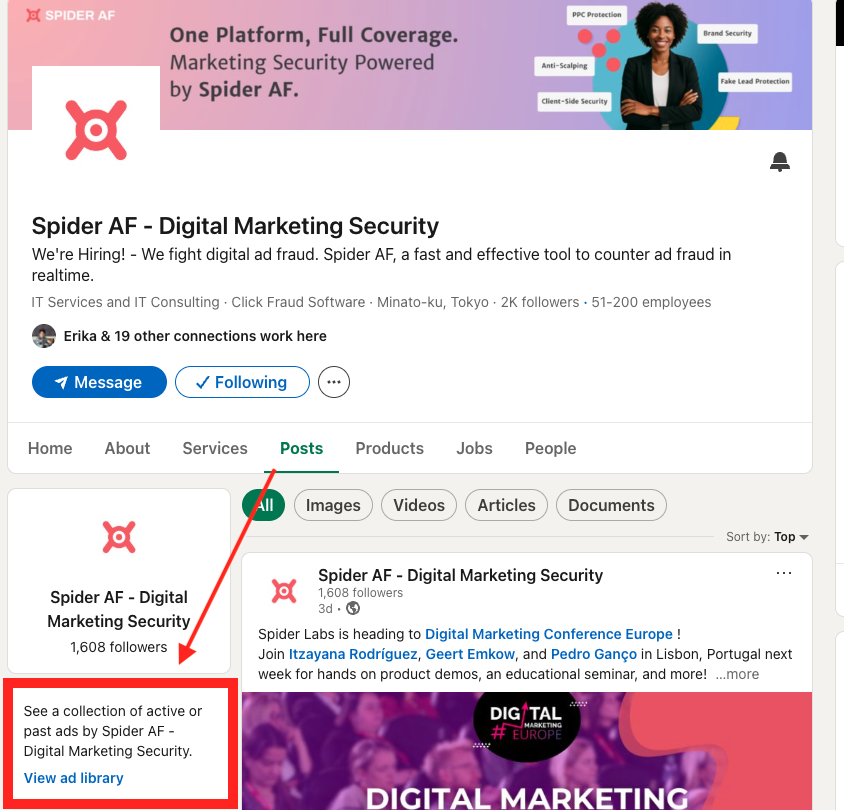
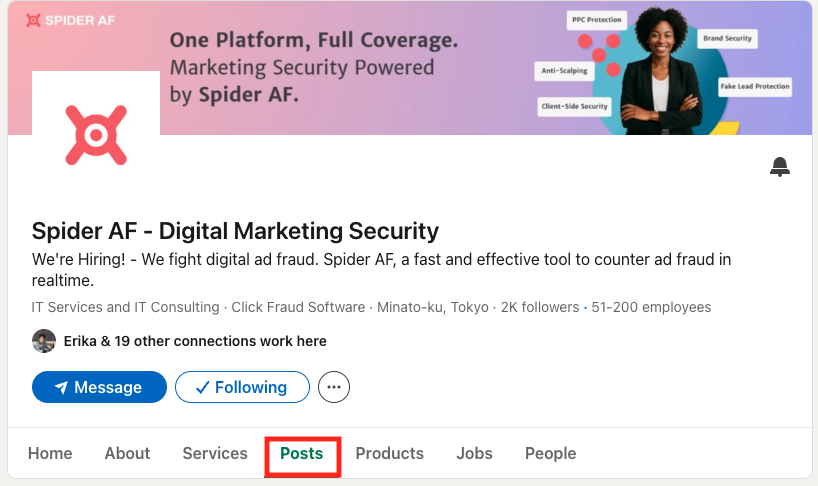
- Search for the competitor on LinkedIn and open their Company Page
- Click the Posts tab in the top navigation
- In the left sidebar, click View ad library
- You are taken directly to the LinkedIn Ads Library filtered for that company — useful for fast one-company lookups
The 2026 Search Filters Explained
Once results appear, the filter panel on the left side narrows results by:
| Filter |
What it does |
Best use |
| Country |
Filters by the region the ad was targeted to |
Isolate your primary market; compare regional messaging differences |
| Date Range |
Filters ads by when they ran (last 30 days, 90 days, or custom) |
Set to last 90 days for active campaigns; spot seasonal pushes |
| Ad Format |
Single image, video, carousel, text ad, document ad, event ad |
Understand where competitors invest creative budget |
| Language |
Filter by the language of the ad copy |
Useful if competitors run multilingual campaigns in the same market |
| Keyword |
Searches within ad copy text (headline, body, CTA button) |
Find every advertiser using a specific pain-point term or category phrase |
EU transparency bonus: For ads targeted to the European Economic Area, click any ad card to open its detail view. You will see an estimated impression range (e.g. 10,000–50,000 impressions), a country-level impression breakdown, and the top targeting parameters the advertiser selected — job function, seniority, industry, and geography. This data is required under the EU Digital Services Act (DSA) and is not available for non-EU-targeted ads.
Is invalid traffic draining your LinkedIn ad budget?
 Download Spider AF's 2026 Ad Fraud White Paper — including the latest LinkedIn IVT rates — and see how much of your spend goes to bots.
Spider AF
Download the free report
What the LinkedIn Ad Library Shows — and What It Hides
Before building a research workflow, it pays to be precise about what the LinkedIn Ads Library does and does not expose. Many teams waste time looking for data that simply is not there.
What you can see (globally — all ads)
- Ad creative: full image, video, carousel slides, or document preview
- Headline, introductory text, and CTA button label
- Advertiser name and payer name
- Ad format (single image, video, carousel, document, text, event)
- Region(s) where the ad ran
- Date the ad first ran and, if ended, when it stopped running
What you can see for EU-targeted ads only (DSA requirement)
- Estimated impression range (e.g. 10,000–50,000)
- Impression breakdown by country (percentage, rounded)
- Top targeting parameters selected by the advertiser: job function, seniority, industry, geography
- Advertiser's legal entity name and registered address
What is never visible
- Budget or total ad spend
- CTR, conversion rate, or engagement metrics
- Exact audience size or full targeting criteria for non-EU ads
- Historical performance trends over time
- Which ads are performing best for the advertiser
The absence of performance data is manageable once you understand a reliable proxy: ad longevity. If a competitor has continuously run the same carousel for 90 days, the probability that it is performing is high. Advertisers do not sustain underperforming creative for three months on a platform where the average LinkedIn CPC runs $8–$15 in competitive B2B categories.
How to Use LinkedIn Ads Library for Competitor Research: 5-Step Workflow

This workflow takes roughly 15 minutes once you have run it once, and around 20 minutes the first time. The output is a competitor messaging map you can use to brief creative teams and surface differentiation gaps your competitors have left open.
Step 1: Build your competitor shortlist (3 minutes)
Choose three to five direct competitors and one adjacent company with noticeably active creative. Keep the list tight — depth on five companies beats skimming fifteen.
If you are unsure who to include, run a keyword search in the LinkedIn Ads Library using a core category term (e.g. "marketing automation" or "B2B data enrichment"). Advertisers that appear across multiple keyword searches are the ones with the biggest active LinkedIn budgets — prioritise those.
Step 2: Search each advertiser and apply filters (5 minutes)
- Go to linkedin.com/ad-library/home
- Type the competitor's company name into the search bar
- Set Country to your primary target market
- Set Date Range to the last 90 days
- Scroll all results and note: (a) total number of active ads, (b) dominant format, and (c) whether they run multiple message variations or a single consistent campaign
A company running 15 active single-image ads is A/B-testing messages at scale. A company running one video ad in a single market is either tightly targeted or early in a campaign. Both tell you something strategically useful.
Step 3: Decode funnel stage from offer type (3 minutes)
Without CTR or conversion data, the ad's offer type is the clearest signal of funnel intent. Use this mapping:
| Offer type in ad |
Funnel stage |
Strategic signal |
| Guide, checklist, report download, thought leadership article |
TOFU (Awareness) |
Competitor is building audience; CPC is typically lower |
| Webinar invite, case study, comparison page, customer story |
MOFU (Consideration) |
Competitor is nurturing known prospects or retargeting visitors |
| Demo request, free trial, "contact sales", pricing page |
BOFU (Decision) |
Competitor is targeting buyers with clear purchase intent |
If all competitors are pushing BOFU offers, there is likely a gap at the top of the funnel — awareness content may outperform in your category. If everyone runs TOFU, you may get better ROI pushing prospects directly to a demo.
Step 4: Extract messaging patterns (5 minutes)
For each ad, copy the headline and first line of body copy into a shared spreadsheet or document. Across the full set, look for:
- Recurring pain points: "wasted spend", "manual processes", "low pipeline quality" — the language the market has validated
- Proof point types: customer logos, statistics, analyst citations, awards, customer counts
- CTA language patterns: "Book a demo" vs. "See how it works" vs. "Get your free report" — what commitment level are they asking for?
- Positioning angles: feature-led, outcome-led, price-led, or authority-led — which angle dominates?
Patterns appearing across multiple competitors reflect validated category language. Angles that are absent from the pattern are your differentiation opportunity.
Step 5: Build your insight output (4 minutes)
Summarise your session into three documents you can share with the creative team immediately:
- Swipe file: Screenshots or saved copies of the five to ten strongest ads (ranked by longevity — ads running 60+ days are likely performing)
- Messaging map: A table showing each competitor's dominant angle, funnel stage focus, most-used proof point type, and top CTA
- Gap list: Two to three angles, formats, or offers that no competitor is currently running — these become your test hypotheses for the next sprint
Running LinkedIn ads? Make sure every click and lead is real.
Spider AF's Fake Lead Protection connects to your CRM and flags fraudulent submissions in real time — before they corrupt your pipeline data.
Spider AF
Start your free trial
AI-Assisted Ad Copy Analysis Workflow

The LinkedIn Ads Library gives you raw material — dozens of ad headlines, body copy snippets, and CTAs spread across multiple competitors. The challenge is turning that volume of text into a coherent picture of the competitive landscape fast. AI tools accelerate this process significantly.
The workflow below takes the output of Step 4 above (your collected ad copy) and puts it through a structured AI analysis session. It works with any large-context AI assistant — ChatGPT (GPT-4o), Claude, or Gemini.
Step 1: Collect raw ad copy from the library
From your competitor research session, copy the headline and first two lines of body copy from at least ten ads across your shortlisted competitors. Paste these into a single document — or directly into an AI chat session. Keep the advertiser name attached to each entry so the model can separate results by company.
Aim for at least two ads per competitor. More is better, up to around thirty ads before returns diminish.
Step 2: Run a pattern analysis prompt
Paste your collected ad copy into the AI and use a prompt in this format:
Sample AI prompt — pattern analysis
- "Below are [N] LinkedIn ad headlines and opening lines from competitors in the [category] space. Analyse these and tell me: (1) which value propositions appear most frequently, (2) which pain points dominate, (3) what CTA patterns are overused, and (4) which angles are absent or underrepresented. Format your answer as a table with a column for each of the four areas."
The output of this prompt is your category language map — a structured view of what the entire competitive set is saying. This is the foundation for differentiation.
Step 3: Generate differentiated angle hypotheses
Once you have the pattern analysis, run a second prompt to generate test hypotheses from the gaps the AI identified:
Sample AI prompt — gap-based ideation
- "Based on the pattern analysis above, write five LinkedIn ad headlines and opening lines that take a differentiated angle none of my competitors are currently using. The target audience is [job title] at [company size] companies. Our product [brief description of your key differentiator]. Lead with the angle that is most absent from the competitor set."
Step 4: Score and rank hypotheses against your existing data
AI-generated copy is a starting point, not a validated answer. Before pushing a new message to live campaigns, run a quick relevance check against your historical LinkedIn data:
- Which of your existing campaigns had the highest CTR or lowest cost per lead? What angle did those ads use?
- Ask the AI: "Of these five new angles, which comes closest to our highest-performing existing message?" — this surfaces the hypothesis most likely to extend a known signal, rather than starting from scratch.
- Prioritise one to two angles for an A/B test in your next campaign sprint
What AI cannot do with LinkedIn Ads Library data
Be precise about the limits. AI can identify patterns in the copy you feed it, generate variations, and rank hypotheses by differentiation. It cannot tell you which competitor ads are actually performing (because the library does not contain that data), and it cannot guarantee that a gap-based angle will convert for your audience. Use AI output as hypothesis input to a proper A/B test — not as a replacement for one.
Advanced LinkedIn Ads Library Search Tactics
Beyond the standard competitor lookup, these four tactics surface intelligence most teams miss.
Keyword search across the entire platform
Instead of searching by advertiser name, search by a keyword — for example, "demand generation" or "pipeline efficiency". This returns every active ad using that term in copy, across all advertisers. You quickly see which companies are occupying the same language territory as you, and how they frame it. Advertisers that appear consistently for multiple pain-point terms are your primary messaging competitors, regardless of whether they are direct product competitors.
Set up a monthly monitoring cadence
Add a recurring calendar reminder (monthly, 15 minutes) to check the last 30 days of ads for your top five competitors. A sudden increase in the number of active ads from one company often signals a new product launch, rebranding, or a quarterly push — giving you early warning to adjust your own messaging before the campaign fully saturates the market.
Use EU ads for targeting intelligence
If your competitors target European markets, the DSA transparency layer gives you their top targeting parameters: job function, seniority level, industry, and geography. Even if your own campaigns target the US or APAC, EU-based targeting data from the same competitor reveals their core ICP (ideal customer profile) assumptions — information that transfers across geos.
Identify format-based content gaps
If every competitor in your category runs single-image ads, document ads (native lead gen downloads) may have lower competition for impression share at equivalent spend. LinkedIn's 2025 data shows video ad volume grew 30% year-over-year — in image-heavy categories, early movers on video often enjoy lower CPMs while the format remains novel in that vertical.
The Part Most Guides Skip: Protecting Your Own LinkedIn Campaigns from Invalid Traffic
Competitive research through the LinkedIn Ads Library is outbound intelligence — you study what others do. But while you look outward, invalid traffic (IVT) may quietly be corrupting your own campaign results inward.
LinkedIn's invalid traffic problem has grown sharply. According to tracking data from multiple measurement sources, LinkedIn's IVT rate reached 17.62% in Q1 2026 — meaning roughly $1,760 of every $10,000 spent on LinkedIn goes to impressions and clicks that will never convert to real pipeline. Bot accounts on LinkedIn have grown from 21.5 million in H1 2019 to an estimated 83.4 million in H1 2025, increasing at roughly 50% annually over the past three years.
LinkedIn partnered with HUMAN Security in June 2024 to strengthen platform-level IVT protection, but the IVT rate continued rising quarter on quarter through Q1 2026. Platform protection alone is not sufficient. Two categories of fraud are especially common on LinkedIn ad campaigns:
Click fraud on LinkedIn ads
Click fraud — invalid clicks generated by bots, click farms, or automated tools — inflates click counts and depletes daily budgets before real prospects see your ads. On LinkedIn, where CPCs typically range from $8 to $15 in competitive B2B categories, even a modest volume of fraudulent clicks can exhaust a campaign budget in hours. Spider AF's 2025 campaign data shows an average 5.1% invalid-click rate across measured LinkedIn campaigns, with outlier networks peaking at 46.9%.
For a full breakdown of how click fraud works and how to detect it on LinkedIn, see: Fake Leads Are Draining Your LinkedIn Ads: Here's How to Stop Them.
Fake leads from LinkedIn Lead Gen Forms
LinkedIn Lead Gen Forms pre-fill contact details from a member's profile, which makes them high-converting — but also a target for abuse. Bots exploit the form automation to submit plausible-looking but entirely invalid contacts, filling CRMs with junk data that distorts lead quality reporting, wastes sales team time, and inflates the apparent CPL on otherwise healthy campaigns. Spider AF recorded one advertiser receiving 400 fraudulent leads in two months through LinkedIn Lead Gen Forms alone.
Unlike click fraud, fake leads are harder to spot in real time because the submission looks legitimate at the point of entry. Post-conversion validation — checking lead quality signals after submission — is the most reliable defence.
For more on the types of invalid traffic that affect B2B campaigns on paid social: A Complete Guide to Invalid Traffic (IVT).
See exactly how much of your LinkedIn budget goes to invalid traffic
Spider AF's PPC Protection and Fake Lead Protection detect invalid clicks and fraudulent form submissions in real time — protecting your LinkedIn ROI.
Spider AF
Request a free demo
LinkedIn Ads Library Limitations and Practical Workarounds
The LinkedIn Ads Library is powerful for what it does — and transparent about what it does not do. These are the most common limitations and how experienced teams compensate for each.
| Limitation |
Practical workaround |
| No performance data (CTR, conversions, ROAS) |
Use ad longevity as a proxy: ads running 60+ days are very likely performing |
| No spend or budget visibility |
Count total active ads and format diversity as a relative investment signal |
| Targeting data only for EU-targeted ads |
Search competitors' EU campaigns to infer global ICP and seniority assumptions |
| Only covers ads from June 2023 onward |
Use LinkedIn's native search and company page post archives for older creative signals |
| No API access for bulk competitor data |
Manual research for small-to-mid competitor sets; third-party ad intelligence tools for enterprise scale |
| Does not show ads removed for policy violations |
Absence of expected competitor volume can itself signal a campaign pause or a policy issue |
Quick-start checklist: your first LinkedIn Ads Library session
- Go to linkedin.com/ad-library/home — no login needed
- Search your top 3 competitors by company name
- Set Country = your primary market, Date Range = last 90 days
- Note: total active ads, dominant format, offer type (TOFU / MOFU / BOFU)
- Copy headlines into a doc — run an AI pattern analysis prompt (see above)
- For EU-targeted ads: click any ad to see impression range and targeting parameters
- Add a monthly calendar reminder to repeat this process (15 minutes/month)
Frequently Asked Questions About the LinkedIn Ads Library
Q: Is the LinkedIn Ads Library free to use?
Yes. The LinkedIn Ads Library is completely free and requires no LinkedIn account or login. Anyone can visit linkedin.com/ad-library/home and search all active sponsored content on the platform.
Q: How do I use the LinkedIn Ads Library for competitor research?
Go to linkedin.com/ad-library/home and search your competitor's company name. Set Country to your primary market and Date Range to last 90 days. Review active ads for messaging angle, offer type (TOFU/MOFU/BOFU), and creative format. Save ads that have been running 60+ days — longevity is a reliable proxy for performance since advertisers do not sustain underperforming creative. Repeat monthly for each competitor on your shortlist.
Q: Can you see a competitor's ad budget or spend in the LinkedIn Ads Library?
No. The LinkedIn Ads Library does not show budget, spend, CTR, or conversion data for any advertiser. For ads served in the EU, it shows an estimated impression range (e.g. 10,000–50,000), but outside the EU no performance or financial data is available.
Q: What is the difference between EU and non-EU ads in the LinkedIn ad library?
Due to the EU Digital Services Act (DSA), ads targeted to the European Economic Area show additional transparency data: estimated impression ranges, top targeting parameters (job function, seniority, industry, geography), and the advertiser's legal identity. Ads targeted outside the EU show only the creative, advertiser name, ad format, and the region where the ad ran.
Q: How long do ads stay visible in the LinkedIn Ads Library?
Ads remain searchable in the LinkedIn Ads Library for one year after their last impression. The library only covers ads that ran from June 1, 2023 onward, so the searchable historical window grows over time as the platform matures.
Summary: Getting the Most from the LinkedIn Ads Library
The LinkedIn Ads Library is a free, no-login-required window into every active sponsored campaign on the world's leading B2B advertising platform. With LinkedIn commanding 41% of B2B paid social budgets and a platform IVT rate now at 17.62% in Q1 2026, the intelligence available here is directly material to both your creative strategy and your budget efficiency.
The teams that extract the most value from the LinkedIn ad library follow three principles:
- Systematise the research: Run the 5-step competitor workflow on a monthly cadence. Messaging strategies change as competitor priorities evolve — what you see in January may be entirely different by Q3.
- Use AI to find the gaps: Pattern analysis at scale reveals angles no competitor in your category is currently using. Those gaps are where differentiated creative performance lives.
- Protect your own campaigns: Competitive research is wasted if invalid clicks and fake leads are corrupting your campaign data. With LinkedIn's IVT rate at 17.62%, clean data is no longer a nice-to-have — it is the prerequisite for any strategic decision.
For more on protecting your paid campaigns from invalid traffic, explore Spider AF's PPC Protection and Fake Lead Protection products.
Stop paying for clicks and leads that are never real
Spider AF protects LinkedIn, Google, and programmatic campaigns from click fraud and fake leads — so your campaign data reflects real prospects, not bots.
Spider AF
Contact our team
Last updated: June 2026 | Sources: eMarketer B2B Digital Ad Spend Forecast 2025; Spider Labs 2025 Ad Fraud Report; LinkedIn Help: Ad Library; LinkedIn Help: Ad Library DSA Targeting Parameters and Impressions; PPC Land: LinkedIn IVT Rate Report Q1 2026


